# New in Version 25.0
*March 4, 2025*
## New General Features
- EmEditor Professional no longer includes AI-related features by default. To keep using these features, you’ll need to download and install the [**ChatAI** plug-in](/download-chatai/) separately. After installing the plug-in, all AI-related commands will be conveniently grouped under a new **AI** menu. The **ChatAI** plug-in is only available on the 64-bit desktop version of EmEditor. Unfortunately, AI features aren’t supported on either the 32-bit or the Store version of EmEditor. [[P]](#pro)
- In **Markdown Design View**, HTML tags in the source text are now displayed as they appear. Additionally, character references and numeric character references are properly decoded and shown correctly. [[P]](#pro)
- You can now stack multiple custom bars, with buttons at the bottom allowing you to quickly switch between them. [[PF]](#profree)
- The **Very Dark** option is now enabled by default. When **Dark Mode** is activated in Windows, EmEditor’s menus, toolbars, and other elements will automatically switch to dark mode. [[PF]](#profree)
- The new version automatically removes older installers from the downloads folder during updates. [[PF]](#profree)
- When you click the button next to the **Search** drop-down list on the **Find** toolbar, we’ve added new commands to this menu: **Selected Text or Word at Cursor**, **Selected Text**, **Word at Cursor**, **Last Used Value**, **Fixed Value**, and **Auto Save**. By default, using the **Set Focus to Find Toolbar** command (Ctrl+D) sets the search string to either the selected text or the word at the cursor position. If you prefer the previous setting, choose **Last Used Value**.
- Added a **Synchronize with Find** command to the menu that appears when you click the button next to the **Replace** drop-down list on the **Find** toolbar. [[P]](#pro)
- You can now easily register a macro file by simply dragging and dropping it onto a basic toolbar, as long as the file has a `.jsee` or `.vbee` extension. If the macro file isn’t already in My Macros, it will be added automatically. [[P]](#pro)
- Previous versions disable line wrapping when very long lines are present. This version removes the limitation. [[PF]](#profree)
```gallery
images:
- src: /media/2025/03/chat-ai-plugin.webp
caption: EmEditor Professional no longer includes AI-related features by default. To keep using these features, you’ll need to download and install the ChatAI plug-in separately.
- src: /media/2025/03/ai-menu.webp
caption: After installing the plug-in, all AI-related commands will be conveniently grouped under a new AI menu.
- src: /media/2025/03/stacked-custom-bars.webp
caption: You can now stack multiple custom bars, with buttons at the bottom allowing you to quickly switch between them.
- src: /media/2025/03/find-bar-find.webp
caption: "When you click the button next to the Search drop-down list on the Find toolbar, we’ve added new commands to this menu: Selected Text or Word at Cursor, Selected Text, Word at Cursor, Last Used Value, Fixed Value, and Auto Save. By default, using the Set Focus to Find Toolbar command (Ctrl+D) sets the search string to either the selected text or the word at the cursor position."
- src: /media/2025/03/find-bar-replace.webp
caption: Added a Synchronize with Find command to the menu that appears when you click the button next to the Replace drop-down list on the Find toolbar.
```
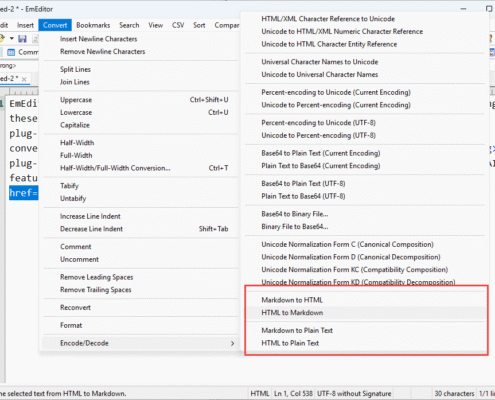
## New Commands
- Markdown to HTML [P]
- HTML to Markdown [P]
- Markdown to Plain Text [P]
- HTML to Plain Text [P]
## Plug-in New Features
- Added the **Create New Document** command to the context menu in the **Chat with AI** custom bar (ChatAI plug-in). [[P]](#pro)
- The **gpt-4.5-preview** model was added to the **Preferred Model** list box in the **AI Options** page of the **Customize** dialog box (ChatAI plug-in). [[P]](#pro)
- A new **HD** checkbox has been added to the **New Prompt** dialog and the **AI Prompt** page in the **Customize** dialog when **Image** is selected for **Output**. If the **HD** checkbox is not selected, images will be generated at normal resolution (ChatAI plug-in).
- Added the **EI_IS_CHATAI_INSTALLED** command to **EE_INFO** message. [[P]](#pro)
```gallery
images:
- src: /media/2025/03/chat-ai-new-document.webp
caption: Added the Create New Document command to the context menu in the Chat with AI custom bar (ChatAI plug-in).
- src: /media/2025/03/ai-models.webp
caption: The gpt-4.5-preview model was added to the Preferred Model list box in the AI Options page of the Customize dialog box (ChatAI plug-in).
- src: /media/2025/03/ai-prompts-hd.webp
caption: A new HD checkbox has been added to the New Prompt dialog and the AI Prompt page in the Customize dialog when Image is selected for Output. If the HD checkbox is not selected, images will be generated at normal resolution (ChatAI plug-in).
```
### Notes
- [P] EmEditor Professional only
- [PF] EmEditor Professional and EmEditor Free