
Forum Replies Created
-
AuthorPosts
-
October 19, 2017 at 12:39 pm in reply to: Increase / decrease line indent doesn't work when nothing is selected #22543
Patrick C
ParticipantThank you Yutaka!
October 4, 2017 at 12:15 am in reply to: Bug or intended feature: doc*.selection.GetBottomPointY(eePosLogical) off by 1 #22460ParticipantHello Yutaka,
Basically I selected with the keyboard (ctrl+F8 for line; shift + end + arrow right for stream)
Written as macro code this would be:to select in line selection mode
editor.ExecuteCommandByID(4154);To select in stream selection mode
document.selection.StartOfLine(false,eeLineView | eeLineHomeText);
document.selection.EndOfLine(true,eeLineView);
document.selection.CharRight(true,1);Importance of virtual space
I now noticed, that a visually (images of the first post #22457) identical selection made in stream selection mode is only different from line selection mode when virtual space is enabled.To me it will remain confusing, that BottomPointY – TopPointY covers n+1 lines when only n were selected with CommandID(4154). Nevertheless, I’ll be fine as long as I can count on this (n+1 lines) consistently being the case when the selection’s last character is a new-line character.
Thanks!
PatrickOctober 3, 2017 at 10:10 am in reply to: Bug or intended feature: doc*.selection.GetBottomPointY(eePosLogical) off by 1 #22458ParticipantOk, figured out one consistency in this:
If the last character of the selection is a newline character (or the last two are CR+LF), then BottomPointY will be one line below the actual selection.With one exception:
When the last line is empty but line-selected,
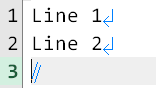
then the last character of that selection is not a new line character but BottomPointY still is one line beyond the end of the selection.Provided future EmEditor versions will continue to have have this BottomPointY behavior, my issue should be solved as I now can simply test whether the last character is new-line or not.
September 22, 2017 at 12:02 pm in reply to: Command ID for “Remove from this (favorite) list” #22452ParticipantHello Yutaka,
Thank you for your reply!
It seems however, that
editor.ExecuteCommandByID(4465);
doesn’t really achieve anything.
Probably this is what you meant with “not available for keyboard shortcut assignment”.It would be nice to have something analogous to:
editor.ExecuteCommandByID (4609 + i); // i is an integer from 0 through 63 (List of Recent Documents command)
EEID_FILE_MRU_FILE1 through EEID_FILE_MRU_FILE1 + 63 (from 4609 through 4609 + 63)
Just with removing the file from the list instead of opening the file.Best regards,
PatrickSeptember 16, 2017 at 1:57 am in reply to: Question: Multi-Cursor select next line above/below via CTRL+ALT Key-UP/Key-DOWN #22441Participanthit CTRL+SHIFT+F8 ; let go; then use the arrow up down keys
ParticipantHave you tried dragging the toolbar back with the ↔ cursor?

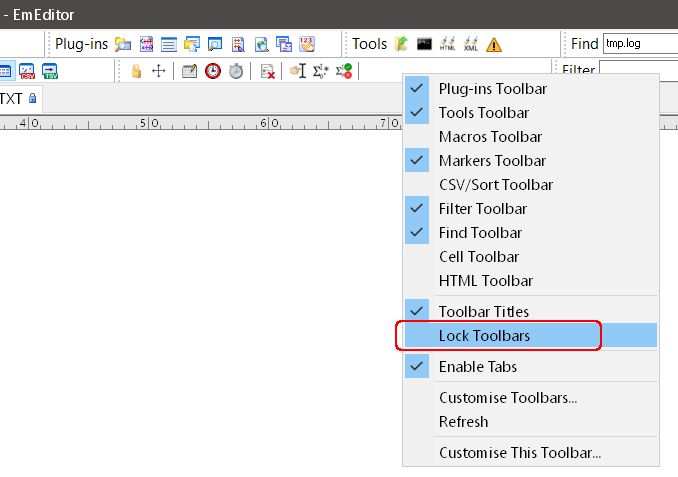
Keeping the EmEditor toolbar locations at bay is tricky. My recommendation is to set your toolbar locations for the window size you usually work with (e.g. maximised on your main screen) and then lock their locations.
In case you frequently hide and unhide toolbars: Set the locations with all toolbars shown, lock, then hide again.Lock by right clicking a toolbar:
 Participant
This is odd – it works on my machine:
Windows 10 with EmEditor Professional (64-bit) Version 17.1.2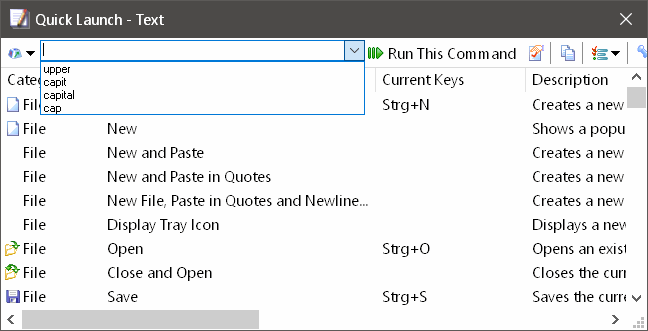 Participant
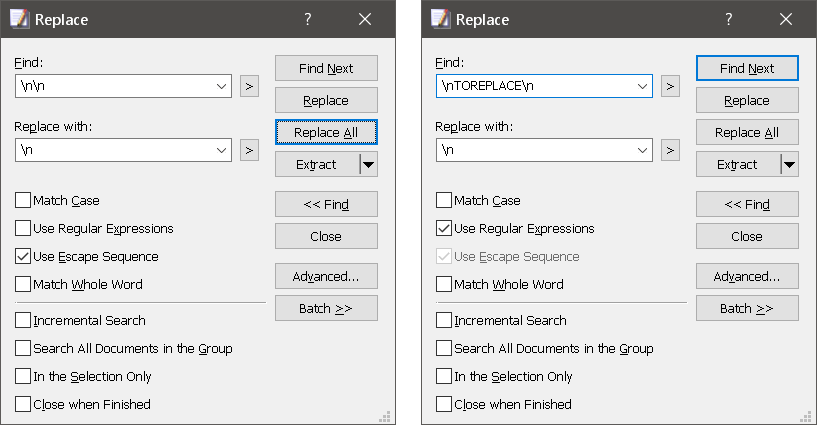
I first panicked when I read this, but wasn’t able to reproduce it.
Filter and replace for example works fine on my Windows 10 machine with EmEditor Professional (64-bit) Version 17.1.2
 September 7, 2017 at 8:36 am in reply to: How to provide parameters for macros executed from the command line? #22388Participant
Dear LifeTimer,
Sorry I wasn’t able to post this earlier, though better late than never…
How to pass command line arguments using registry values without having to close EmEditor:
Approach 1: using multiple command line statements
reg add "HKCU\_Patrick_custom_" /v str1 /t REG_SZ    /f /d "ab cd"
reg add "HKCU\_Patrick_custom_" /v str2 /t REG_SZ    /f /d "1234"
reg add "HKCU\_Patrick_custom_" /v num1 /t REG_DWORD /f /d 1234
Regarding the syntax:
// /v value name (“variable name”)
// /t variable type: REG_SZ = string; REG_DWORD = 32-bit integer
// /f force overwrite already existing value without prompting for Y/N
// /d data to be written (“assigned to the variable”)to visualise the values in the registry:

then call the EmEditor macro
"c:\Program Files\EmEditor\EmEditor.exe" /mf "d:\tmp\mymacro.jseewith the macro code being
var WshShell = new ActiveXObject( "WScript.Shell" );
var str1 = WshShell.RegRead( "HKCU\\_Patrick_custom_\\str1" );
var str2 = WshShell.RegRead( "HKCU\\_Patrick_custom_\\str2" );
var num1 = WshShell.RegRead( "HKCU\\_Patrick_custom_\\num1" );
alert( str1 );
alert( str2 + 1 );   // an imported string is not automatically a number
alert( num1 + 1);    // an imported DWORD really is an integer
Approach 2: using one single command line statement
If, and only if it really has to be a one liner:
reg add "HKCU\_Patrick_custom_" /v str1 /t REG_SZ /f /d "xyz" && "c:\Program Files\EmEditor\EmEditor.exe" /mf "d:\tmp\mymacro.jsee"I hope this will be of use for someone.
Credits:
https://www.windowscentral.com/how-edit-registry-using-command-prompt-windows-10
http://www.emeditor.org/en/macro_tutorial_tutorial_regread.htmlSeptember 5, 2017 at 7:22 am in reply to: How to provide parameters for macros executed from the command line? #22359ParticipantJust worked on the same problem today – guess I was lucky
The command line therefore is
set myarg=blabla && start "" "c:\Program Files\EmEditor\EmEditor.exe" /mf "d:\tmp\mymacro.jseeThe macro file code then is
var she = new ActiveXObject("wscript.shell");
myarg = she.ExpandEnvironmentStrings("%myarg%");
alert(myarg);
There is one important issue though:
Emeditor must not yet run when calling. Most likely because once running it would only have access to environment variables which existed upon starting EmEditorHope this helps
PatrickPS Credits for those who brought me on the right path:
/forums/topic/macro-scripting-importexport-of-filter-settings/
https://stackoverflow.com/questions/21315708/reading-environment-variables-with-javascript
https://superuser.com/questions/424001/launch-windows-program-with-custom-environment-variableSeptember 1, 2017 at 3:19 am in reply to: Enabling / disabling Macro Events using a macro in EmEditor Version 17+ #22346ParticipantHello Yutaka,
explain why
To be honest: Because I’m lazy.
I’d like to have a Runs at Events on/off button → 1 mouse click required
Presently it take 4 mouse clicks to turn an event on and off.As I have to do this often, it does make a difference
Regarding priorities:
I don’t urgently need this – its more like a “very nice to have” convenience feature.Thank you for your great support!
PatrickParticipantYutaka’s workaround works on my machine :)
Thank you!!! Presently I do need this feature quite often.
ParticipantI also tried downgrading – but at a price. The reason is that Emeditor transfers certain settings from version 16.9.3 to version 17. Those settings cannot be recovered when downgrading – except if you didn’t run “Delete old settings”. In my case I made a mess with my settings (own fault, I didn’t realise at first).
In any case, if you didn’t run “Delete old settings”, then you can give downgrading a try (at your own risk):
http://files.emeditor.com/emed64_16.9.3.exeParticipantNot as far as I can see, though Yutaka could extend the already existing Hunspell interface to optionally use LanguageTool.
I.e. provided there is sufficient user demand.
Hunspell so far is sufficient for me, mainly because spell-critical documents tend to be formatted and thus written in MS-Word / LibreOffice Writer or an Email app.ParticipantFollow up question for Yutaka:
How are the macro settings in versions 17+ now accessed from within a macro?
Before v17 it was
sMacro1 = editor.GetProfileString(eeRegMacros, “”, “Macro1”, -1);Consequently
/forums/topic/macro-menu-toggle-runs-at-events-option-for-macros/
will probably have to be re-written.ParticipantYep – same here, just wanted to post the issue as well ;)
Macro “Runs at Events” doesn’t work any more on my computer either.April 23, 2016 at 2:27 am in reply to: Opening some files results in unresponsive UI and high CPU usage 15.9.0.0 x64 #20794ParticipantHi Dan
EmEditor Version 15.9.0 didn’t misbehave when opening the file index.md in my case. Perhaps you are on the wrong track.
Could it be something else: Security software? Network connection?Patrick
ParticipantThank you Stefan!
ParticipantI sometimes have the same problem with xhtml. Most likely you’ll need an external tool.
In my case I use an external tool called htmltidy. Emeditor doesn’t seem to have integrated such a tool.Similar tools for xml exist; google for example lists:
http://www.freeformatter.com/xml-formatter.html
http://www.cleancss.com/xml-beautify/
http://www.webtoolkitonline.com/xml-formatter.htmlHope this helps.
ParticipantUploaded a new version (improved the backward tab behaviour).
The newest version will be posted under the same Google Drive link as above.PS
I’ll no longer update the library, except if I can find out how to delete outdated code.ParticipantPPS Thanks to Yutaka for the support!
-
AuthorPosts